
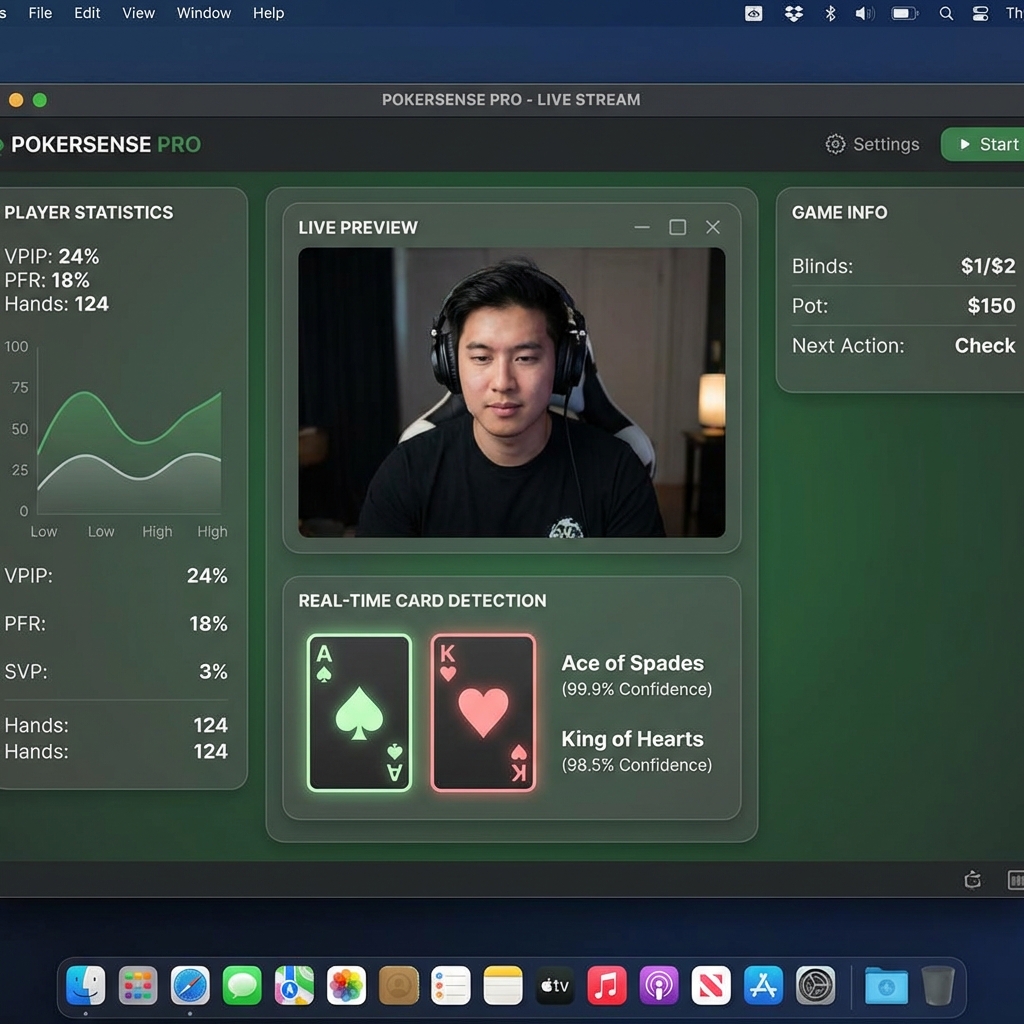
All Input Equals Error
This software was made with the motto, "All Input Equals Error." This is meant to be the most intuitive poker software on the market.
The software takes into account that sitting behind the desk and managing scenes is a brutal task, so I built a broadcast overlay which talks directly to the game engine so that scenes can be switched based on which players turn it is. A group of friends with zero technical experience can literally start streaming games in one day.
CardEYE: Solving the Vision Problem
To pull this off, I developed CardEYE. An AI trained with the largest and highest quality card dataset available on the internet. Composed of 21,000 640 by 640 images, and on a YOLOv8x model, CardEYE v1 was made.
I discovered that this AI was exceptional at reading cards from a birds-eye point of view. This meant that the AI vision problem for reading board cards was essentially solved.
What took me a couple rounds of testing to realize was that when you would peel a card and look at it, the AI struggled to recognize the card. The only workaround under the v1 architecture was to hold the cards awkwardly far away from the camera.
This led me to create an AI specialized for peeled cards. This is a very different task. Something I learned while making CardEYE v1 was that I had found an amazing dataset. This meant that for the v2 architecture I could use data from the v1 training set, and mix it with my own. I made my own data by placing the webcam on a table, holding a pair of cards out, and manually labeling the boxes to get them as tightly around the corner as possible.
🔬 The Synthetic Data Rabbit Hole
One of the most fascinating things to me is synthetic data. Synthetic data is important in the real world because that is when the intelligence curve starts to get vertical. When I first learned about this I got pretty excited and set out to make the most cracked dataset possible. I used my existing CardEYE v1 to draw boxes and label the cards quickly and autonomously.
A mistake I made here was not including the card background next to the tiny boxed images. This was not a real world scenario in the slightest. Without knowing, I went along and put the massive datasets onto Google Drive, these datasets were 150K images, and 650K images and took literally days to upload.
While training I actually got very excited, I literally thought I solved AI vision via bruteforce generating synthetic data. With a 99.5% mAP-50-95 I was ecstatic. I was quickly proven wrong after testing, while testing the highest percentage was 36% and completely wrong. I knew after that I was massively overcomplicating things.
All I needed was a natural dataset with a python script to generate multiple versions of the natural dataset. I kept going with some of the lessons learned in the failed attempt. The new dataset in the v2 model was largely composed of the one I had made, with strict image augmentations (brightness, blurriness, etc). After the next training run it went pretty well, and with reasonable lightning conditions the model worked in multiple different environments. Both the specialized CardEYE models are on my GitHub so check them out!
Video Encoding: The Real Boss Fight
I always tell people that when making this program (100K lines of code), the top 3 technical problems were video encoding, video encoding, and video encoding. I had to have spent months brute-forcing a solution.
Attempt 1: DroidCam (WiFi)
My initial approach was to use an app called "DroidCam". This was an app that used wifi to send video from the phone directly without a cable. For recording YouTube videos, this was actually the perfect approach, as you could work with a little amount of cables and send video to any device on the same network.
Now our hardware by no means was good. We had four iPhones with the newest one being a 15 Pro Max and the oldest one being a standard 11. The video when I tested it had a major problem, the feeds were not synced. The newer models felt instantaneous while the older ones showed signs of delay. After doing some research this was an unpatchable, known consequence of working with hardware that wasn't state of the art.
Attempt 2: WebRTC
One of the most brutal moments was spending a month developing a WebRTC video pipeline, only to find out that it doesn't work on non-P2P networks, or in simple terms: public wifi. For context I am a student who spends a lot of time either in my apartment, or on campus.
While building out this WebRTC pipeline, because I had a strict "All Input Equals Error" mentality I was hardstruck determined on getting a full live video setup to display on my browser. I then realized this architecture was dumb and ridiculous.
Attempt 3: Third-Party macOS Framework
After switching to developing my own macOS app, I had installed a 3rd party framework from GitHub, and to no shock, it failed again. After weeks of debugging, it was obvious I had to zoom out and look at the architecture. I was trying to use an outdated GitHub framework on a non-P2P network. I switched to USB video that day.
Attempt 4: MJPEG over USB
Now again the obvious thing in my mind at the time was to use MJPEG. This was pretty straightforward in terms of building and testing, but no matter how I worked with it, the video just wasn't high quality, and it wasn't that "snappy" look that I was chasing after. I did learn that MJPEG literally just sends 30 JPEG images per second which can be pretty data intensive even for modern USB cables.
Attempt 5: iproxy + H.264
After looking into things to try I ran into an Apple dedicated USB video program called "iproxy". With me using a MacBook and an iPhone, it seemed like a no-brainer. This used H.264 instead of MJPEG, a more modern and less data intensive way to send video.
Now I was still in the mindset of "My phone can record 4K60 so I should be able to broadcast it." This mentality took a couple weeks off of my life. I spent weeks simplifying my architecture, building the iOS app, and the macOS app at the same time.
I was losing my mind doing this effectively for two weeks straight until I realized that the iPhone hardware was genuinely not capable of sending 250M pixels of information (roughly 4K) every second. It was just too much for the silicon chip to handle, and Apple didn't engineer their chips for such a niche demand.
I was left with two options, jailbreak the iPhone and try to access the raw sensor, or try 1080p30. I went with the latter, shortly after, I finally got it to work. I had done it. I held my phone up next to my MacBook webcam and the latencies were identical. It literally gave me goosebumps I was so happy.
Architecture
iOS App → iproxy
H.264 video from iPhones over USB with near-zero latency
Poker Panel FX (macOS App)
Receives video streams, runs CardEYE inference via CoreML, handles broadcast overlay
Game Engine
Python backend tracks game state, manages seats, controls scene switching
Tech Stack
What I Learned
- 99.5% accuracy means nothing if it doesn't work in the real world. My synthetic data experiment looked incredible on paper. Then it completely failed on actual cards.
- Sometimes the answer is to do less. 4K60 wasn't working because it was too much. 1080p30 worked perfectly. Hardware has limits.
- Zoom out before you debug. I spent weeks fixing code that was architecturally broken. WebRTC will never work on public WiFi. No amount of debugging changes that.
- Multi-agent workflows accelerated everything. After solving video encoding, I used test scripts and stress tests to speedrun the game engine development. The UI got simpler over time.
What's Next
After solving video encoding it was actually pretty smooth sailing from there. I used a multi-agent workflow to try to speedrun develop all the other features. Utilizing test-scripts and stress tests and then fact checking the math worked really well for accelerated development of the game engine/button handlers. And over time the UI was able to get simpler and simpler.
I am currently using Poker Panel for my YouTube channel, where me and some college friends play poker and record our games. After some polishing I can see a future where this software becomes widespread.
The overarching goal of Poker Panel was to make a poker broadcast software that was affordable, simple, and a pleasure to use. This software achieves that.